plotEffects and plotInteraction on CompactLinearModel, and the anova method
Last week five methods landed on CompactLinearModel. This week added two more - plotEffects and plotInteraction - and brought the anova method to LinearModel for the first time.
Project Status
Week 1 was project planning and setup.
Week 2 was the class shell: properties, access rules, the display method, and the subsref gatekeeper.
Week 3 was the constructor and fitlm: the math solver, all the diagnostics, the full 26-property object, and the front-end parser.
Week 4 was applying mentor feedback, refactoring the constructor, and adding predict and random.
Week 5 was feval, coefCI, coefTest, dwtest, and addTerms.
Week 6 was removeTerms, plotResiduals, plotDiagnostics, plotEffects, and a set of bug fixes.
Week 7 was the midterm evaluation, robust regression, plotAdjustedResponse, and plotAdded.
Week 8 was plot, plotInteraction, compact, and the initial CompactLinearModel structure.
Week 9 was coefCI, coefTest, predict, random, and feval on CompactLinearModel, plus two bug fixes.
This week was plotEffects and plotInteraction on CompactLinearModel, and the anova method on LinearModel.
plotEffects - here
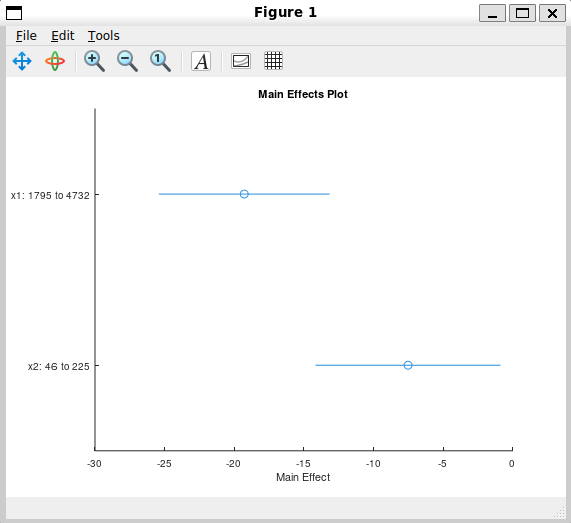
plotEffects shows how much each predictor moves the response, on its own, holding everything else fixed. It was already working on LinearModel, and it worked by going straight to the training data every time it was called: moving one predictor from its lowest to its highest observed value, keeping every other predictor at its average, and reading off how much the fitted response changes.
That approach can’t carry over to CompactLinearModel as-is, because a compact model deliberately throws away the training data to stay small. So instead of computing the answer live, LinearModel now works out the exact same contrast once, right when the model is fit, and stores it in a new hidden property called EffectContrasts - one row per predictor. This gets carried over automatically whenever compact is called, the same way properties like TermsMatrix already are.
LinearModel.plotEffects itself was changed to just read from EffectContrasts instead of recomputing it every time it’s called - a pure refactor, so the numbers it draws are unchanged from before. CompactLinearModel.plotEffects is a new, separate implementation that reads the same cached contrast, matching how the rest of the package keeps each class’s methods independent instead of sharing code across files.
load carsmall
mdl  = fitlm ([Weight, Horsepower], MPG, 'linear');
cmdl = compact (mdl);

plotEffects (mdl)     ## already worked
plotEffects (cmdl)    ## now works too, using the cached contrast
plotInteraction - here
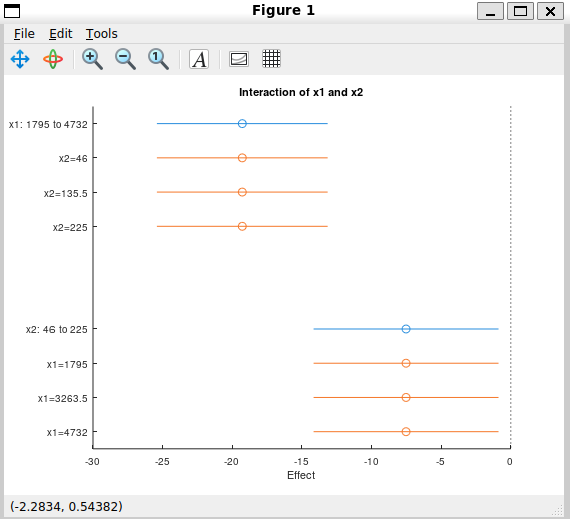
plotInteraction shows whether two predictors interact, by comparing each one’s effect on its own against its effect when the other predictor is held at a few different values. The same problem applied here: it needed the training data to compute those comparisons.
The same fix was used. A second new hidden property, InteractionContrasts, stores the contrasts needed for every pair of predictors that appear together in the model, computed once at fit time and carried over by compact just like EffectContrasts. CompactLinearModel.plotInteraction reads from it directly.
plotInteraction (cmdl, 'x1', 'x2') ## effects mode, default
anova on LinearModel - here
anova answers a simple question: out of everything in the model, how much is each individual predictor actually pulling its weight? It takes a fitted model and returns a table that breaks the total variation in the data into one row per predictor, plus a leftover “Error” row for whatever the model couldn’t explain.
octave:28> load carsmall
octave:29> mdl = fitlm ([Weight, Horsepower], MPG, 'linear');
octave:30> anova (mdl)
ans =
  3x5 table

              SumSq     DF    MeanSq        F         pValue
             _______    __    _______    _______    ___________

    x1       645.868     1    645.868     39.042    1.35188e-08
    x2       83.7784     1    83.7784    5.06431        0.02686
    Error    1488.86    90    16.5429        NaN            NaN
Each row shows how much that one predictor contributes on its own, along with a p-value telling you whether that contribution is likely to be real or just noise. A small p-value means that predictor is probably doing genuine work in the model.
There’s also a summary view, which zooms out and shows the bigger picture instead of one row per predictor - how much the whole model explains versus what’s left unexplained:
octave:44> anova (mdl, 'summary')
ans =
  3x5 table

                 SumSq     DF    MeanSq       F         pValue
                _______    __    _______    ______    ___________

    Total       6004.76    92    65.2691       NaN            NaN
    Model        4515.9     2    2257.95    136.49    5.57376e-28
    Residual    1488.86    90    16.5429       NaN            NaN
Under the hood there’s more than one accepted way to measure “how much a predictor contributes,” and anova supports the main ones MATLAB does, with one less common variant still on the to-do list rather than shipped half-working.
Worth a quick note on why this was written from scratch rather than reused: there’s another anova already in the package, built for a different GSoC project, that also happens to accept a fitted model as input. But it’s really a different tool underneath - it builds its own separate kind of object, not the plain table that LinearModel.anova is supposed to return. Since the two don’t actually do the same job, the right move was a fresh implementation built specifically around how LinearModel stores its terms and coefficients, rather than bending an unrelated tool to fit.
Development Branch
All the code is on this branch: gsoc-2026-linearmodel
Next Steps
anovaonCompactLinearModel.stepand stepwiselm - automated model selection by forward and backward stepping.
Stay tuned for the next update!