Midterm evaluation, two new plotting methods, and robust regression
This week is the midterm point for Google Summer of Code 2026. The first half of the project is done, so before moving forward I put together four pull requests covering everything built since day one. Alongside that, this week also brought robust regression support to LinearModel, two more plotting methods, a hierarchy fix for how power terms behave in addTerms and removeTerms, and a round of documentation and test improvements ahead of the midterm submission.
Project Status
Week 1 was project planning and setup.
Week 2 was the class shell: properties, access rules, the display method, and the subsref gatekeeper.
Week 3 was the constructor and fitlm: the math solver, all the diagnostics, the full 26-property object, and the front-end parser.
Week 4 was applying mentor feedback, refactoring the constructor, and adding predict and random.
Week 5 was feval, coefCI, coefTest, dwtest, and addTerms.
Week 6 was removeTerms, plotResiduals, plotDiagnostics, plotEffects, and a set of bug fixes.
This week was the midterm evaluation, robust regression, two new plotting methods, and a hierarchy fix.
Midterm Pull Requests
Four pull requests were submitted to the statistics package repository to cover everything built so far:
PR 1 - improve fitlm to return a LinearModel object
PR 2 - Add LinearModel classdef in octave
PR 3 - fix power-term resolution from base table column in parseWilkinsonFormula function.
PR 4 - refine the BIST calling fitlm to call anovan in multcompare function.
Robust Regression Support - here
The biggest new feature this week is support for the RobustOpts option in fitlm. Ordinary least squares minimises the sum of squared residuals, which means a single outlier can pull all the coefficients noticeably. Robust regression fits the model by iteratively downweighting observations that have large residuals, so outliers have much less influence on the final estimates.
## ordinary least squares (default)
mdl = fitlm (X, y)

## robust fit using the bisquare weighting function
mdl = fitlm (X, y, 'RobustOpts', 'on')

## specify the weighting function by name
mdl = fitlm (X, y, 'RobustOpts', 'bisquare')
mdl = fitlm (X, y, 'RobustOpts', 'andrews')
mdl = fitlm (X, y, 'RobustOpts', 'cauchy')
mdl = fitlm (X, y, 'RobustOpts', 'logistic')
mdl = fitlm (X, y, 'RobustOpts', 'talwar')
mdl = fitlm (X, y, 'RobustOpts', 'welsch')
mdl = fitlm (X, y, 'RobustOpts', 'huber')

## or pass a struct with a custom weighting function and tuning constant
opts.RobustWgtFun = @(r) (abs(r) < 1) .* (1 - r.^2).^2;
opts.Tune = 4.685;
mdl = fitlm (X, y, 'RobustOpts', opts)
When RobustOpts is anything other than 'off' (the default), the constructor calls lm_robust_fit instead of lm_fit. This runs IRLS - Iteratively Reweighted Least Squares - where each iteration computes residuals, converts them to weights using the chosen weighting function, and re-fits the model. The loop continues until the weights stop changing, or until a maximum number of iterations is reached.
The Robust property of the returned model now records what was used:
mdl = fitlm (X, y, 'RobustOpts', 'bisquare');
mdl.Robust.RobustWgtFun   ## function handle for the bisquare weighting function
mdl.Robust.Tune            ## 4.685 (the default bisquare tuning constant)
mdl.Robust.Weights         ## n x 1 vector of final iteration weights per observation
Observations with large residuals get weights close to zero. Observations that fit well get weights close to one. The ordinary least squares fit is the special case where every observation gets weight one.
The display also changes when a robust fit is detected:
octave:1> mdl_r = fitlm (X, y, 'RobustOpts', 'bisquare')
mdl_r =

  Linear regression model (robust fit):
      y ~ 1 + x1 + x2
  ...
Here is an example comparing the two fits on data with one outlier:
n = 20;
X = (1:n)' / n;
y = 2 * X + 0.1 * randn (n, 1);
y(10) = 8;                             ## introduce a heavy outlier
octave:38> mdl_ols = fitlm (X, y)
mdl_ols =

  Linear regression model:
      y ~ 1 + x1

  Coefficients:

  2x4 table

                   Estimate       SE        tStat      pValue
                   ________    ________    _______    ________

    (Intercept)    0.442825    0.747864    0.59212    0.561135
    x1              1.83065     1.24861    1.46615    0.159859


Number of observations: 20, Error degrees of freedom: 18
Root Mean Squared Error: 1.60993
R-squared: 0.106682,  Adjusted R-Squared: 0.0570533
F-statistic vs. constant model: 2.1496, p-value = 0.159859
octave:39> mdl_rob = fitlm (X, y, 'RobustOpts', 'bisquare')
mdl_rob =

  Linear regression model (robust fit):
      y ~ 1 + x1

  Coefficients:

  2x4 table

                    Estimate        SE         tStat        pValue
                   __________    ________    _________    __________

    (Intercept)    0.00482532     0.30851    0.0156407      0.987693
    x1                2.00433    0.515079      3.89131    0.00106994


Number of observations: 20, Error degrees of freedom: 18
Root Mean Squared Error: 0.664132
R-squared: 0.533635,  Adjusted R-Squared: 0.507726
F-statistic vs. constant model: 20.5964, p-value = 0.000254559
Hierarchy Fix in addTerms and removeTerms - here
A subtle but important change was made to how addTerms and removeTerms handle polynomial notation.
Previously, writing addTerms(mdl, 'x1^2') only added the single term x1^2 to the model, even if x1 was not already there. This was wrong from a Wilkinson notation perspective: a polynomial term at power 2 implies the lower-order term at power 1 should also be present. The fix makes bare power notation follow the hierarchy rule:
## before the fix: only x1^2 was added, x1 was left out
## after the fix: x1 AND x1^2 are both added (the hierarchy is respected)
NewMdl = addTerms (mdl, 'x1^2')
The rule is: when a bare power term like 'x1^2' is passed, all powers from 1 up to the specified exponent are added together. So 'x1^3' adds x1, x1^2, and x1^3 at once. This matches how MATLAB handles the same notation.
The exception is when a power appears inside an interaction, like 'x1:x2^2'. In that case the exact term is added without expanding the hierarchy, because the interaction notation already has a specific meaning.
The same logic now applies to removeTerms - a bare 'x1^2' removes x1 and x1^2 together.
Both addTerms and removeTerms also now sort the resulting terms matrix in a consistent order: intercept first, then main effects ordered by predictor, then interactions, then polynomial terms. This keeps the coefficient table readable regardless of the order in which terms were added or removed.
plotAdjustedResponse - here
plotAdjustedResponse shows the relationship between the response and one predictor after removing the effect of all the other predictors. The idea is to isolate what one specific predictor contributes, on its own.
plotAdjustedResponse (mdl, 'x1')      ## by predictor name
plotAdjustedResponse (mdl, 1)         ## by index into VariableNames
plotAdjustedResponse (ax, mdl, 'x1')  ## into a specific axes
h = plotAdjustedResponse (mdl, 'x1')  ## get the graphics handles back
Imagine you have a model with three predictors. You want to see the relationship between just x1 and the response, but x2 and x3 are also in the picture and their effects are tangled in. plotAdjustedResponse untangles this by holding x2 and x3 at their average values and showing you what the response looks like as x1 changes. The fitted line is that relationship. The scatter points are where the actual observations land after the same adjustment is applied to them.
So the plot answers a simple question: if you could freeze all the other predictors at their average, what does the response look like as this one predictor moves?
load carsmall
X = [Weight, Horsepower];
mdl = fitlm (X, MPG, 'linear');
plotAdjustedResponse (mdl, 'x1')
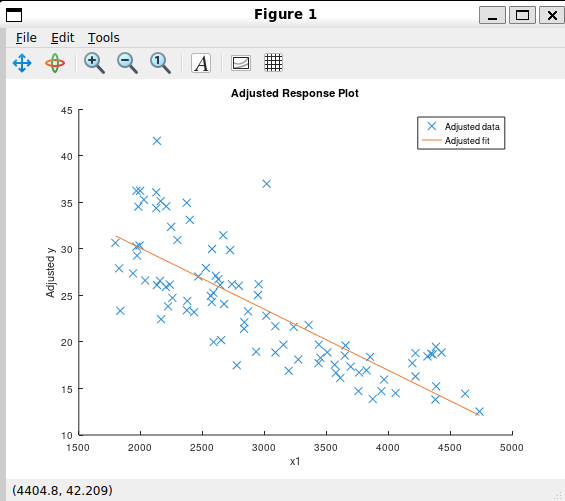
The method returns two handles: h(1) is the scatter of adjusted data points and h(2) is the fitted line.
plotAdded - here
plotAdded shows the incremental effect of one predictor (or group of predictors) after accounting for everything else already in the model. It is also known as a partial regression leverage plot or an added variable plot.
plotAdded (mdl)            ## added variable plot for the whole model
plotAdded (mdl, 'x1')     ## for a specific predictor by name
plotAdded (mdl, 2)         ## for the second coefficient by index
h = plotAdded (mdl, 'x1') ## get the handles back
Say you have a model with x1, x2, and x3. You want to know what x1 alone is adding, beyond what x2 and x3 already explain. plotAdded removes the shared influence by fitting y with only x2 and x3, and separately fitting x1 with only x2 and x3. Both those fits have residuals - the leftover parts that x2 and x3 could not explain. Plotting those two sets of residuals against each other shows you the pure relationship between x1 and the response, with everything else already accounted for.
If the points follow a clear line, x1 is genuinely contributing something. If they form a random cloud, x1 is not adding anything the other predictors do not already cover.
load carsmall
X = [Weight, Horsepower, Acceleration];
mdl = fitlm (X, MPG, 'linear');
plotAdded (mdl, 'x1')
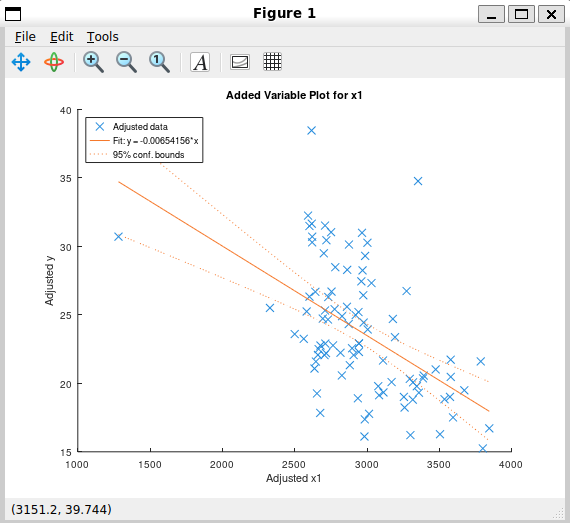
The method returns three handles: h(1) is the adjusted data scatter, h(2) is the fitted line through the scatter, and h(3) is the 95% confidence bounds on that fitted line.
Documentation and Test Improvements
Both LinearModel and fitlm now have full Texinfo documentation, so help LinearModel and help fitlm in Octave show properly formatted descriptions covering all input forms, options, and outputs. Demo blocks were also added to LinearModel so demo LinearModel runs working examples directly in the terminal.
The test suite was extended with the Hald cement dataset, a classic 13-observation reference dataset, to verify coefficient estimates, standard errors, residuals, diagnostics, and model criteria all at once on known ground truth values. A second set of tests covers the purequadratic modelspec on the same data, checking that polynomial terms are built and sorted correctly and that predict works on new data for polynomial models.
The multcompare test suite also had one test still calling the old fitlm interface, which returned a cell array instead of a LinearModel object. That test was updated to call anovan directly, which is what multcompare actually depends on.
Development Branch
All the code is on this branch: gsoc-2026-linearmodel
Next Steps
With the midterm evaluation done and most of the core methods in place, the remaining work for the second half of the project is:
- plotSlice - shows the predicted response as a function of each predictor individually, holding the others fixed.
- plot - a simple scatter plot of observed versus fitted values.
- plotInteraction - shows how the effect of one predictor changes at different levels of another.
- stepwiselm - automated model selection by forward and backward stepping.
- CompactLinearModel - a lightweight version of the model that drops the training data and is suitable for deployment.
Stay tuned for the next update!