Two new plotting methods, the compact method, and CompactLinearModel
This week two more plotting methods were added to LinearModel: plot and plotInteraction. The compact method was also implemented, along with the initial CompactLinearModel classdef. On the code organisation side, the mentor extracted four internal helper functions into shared private files so they can be reused across the package.
Project Status
Week 1 was project planning and setup.
Week 2 was the class shell: properties, access rules, the display method, and the subsref gatekeeper.
Week 3 was the constructor and fitlm: the math solver, all the diagnostics, the full 26-property object, and the front-end parser.
Week 4 was applying mentor feedback, refactoring the constructor, and adding predict and random.
Week 5 was feval, coefCI, coefTest, dwtest, and addTerms.
Week 6 was removeTerms, plotResiduals, plotDiagnostics, plotEffects, and a set of bug fixes.
Week 7 was the midterm evaluation, robust regression, plotAdjustedResponse, and plotAdded.
This week was plot, plotInteraction, compact, and the initial CompactLinearModel structure.
Private Functions Extracted by the Mentor
Before this week’s new methods were written, the mentor extracted four pieces of internal logic that were being used only inside LinearModel into standalone private functions. These now live in inst/private/ and can be called by any class in the package:
build_design- builds the design matrix from a terms matrix and an encoded predictor matrixencode_categorical- converts categorical columns into reference-coded dummy variablesparse_modelspec- turns a modelspec keyword or string into a terms matrixreencode_predictors- re-encodes predictor data for prediction, handling categorical levels and power terms
LinearModel now just calls these directly instead of carrying its own copies. Any future class that needs the same logic, like GeneralizedLinearModel, can call them too.
plot - here
plot is a smart dispatcher. It looks at how many active predictors the model has and picks the most useful chart automatically.
plot (mdl)        ## picks the right plot automatically
h = plot (mdl)    ## get the graphics handles back
plot (ax, mdl)    ## target a specific axes object
There are three cases:
No active predictors - falls back to plotResiduals and shows the residual histogram.
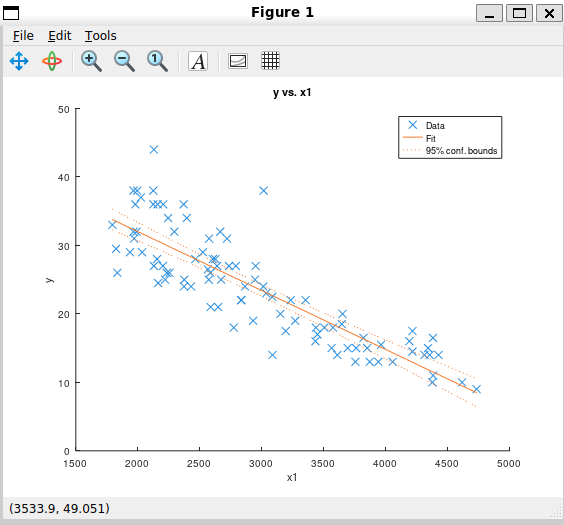
Exactly one predictor - draws a scatter of the observed data with the fitted line and its 95% confidence bounds overlaid. For a categorical predictor, the x-axis shows the category levels.
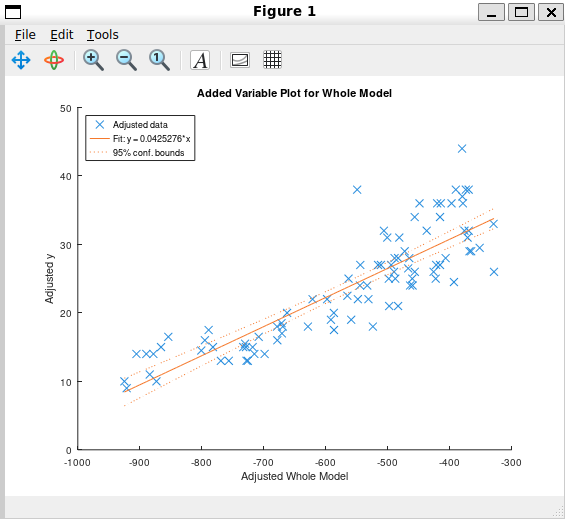
Two or more predictors - delegates to plotAdded and shows the added variable plot for the whole model.
load carsmall
mdl1 = fitlm (Weight, MPG, 'linear');
plot (mdl1)     ## one predictor: scatter + fitted line + confidence bounds
mdl2 = fitlm ([Weight, Horsepower], MPG, 'linear');
plot (mdl2)     ## two predictors: delegates to plotAdded
plotInteraction - here
plotInteraction shows how two predictors relate to each other in the model. You always pass two variable names, and optionally a plot type.
plotInteraction (mdl, 'x1', 'x2')               ## default: effects plot
plotInteraction (mdl, 'x1', 'x2', 'effects')    ## same as above
plotInteraction (mdl, 'x1', 'x2', 'predictions') ## predictions plot
h = plotInteraction (mdl, 'x1', 'x2')            ## get handles back
plotInteraction (ax, mdl, 'x1', 'x2')            ## into a specific axes
There are two modes.
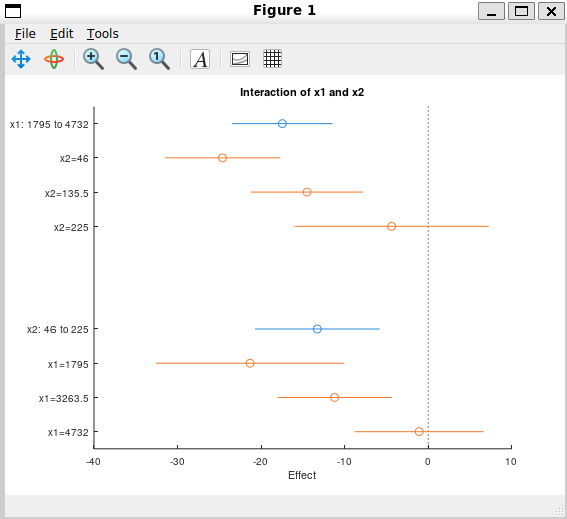
'effects' mode (default) shows each predictor’s effect as a dot with a 95% confidence interval line through it. It also shows conditional effects: what happens to one predictor’s effect when the other is held at a few different values. If those conditional effect points sit at the same height as the main effect, the two predictors are not interacting. If they scatter at different heights, there is an interaction between them.
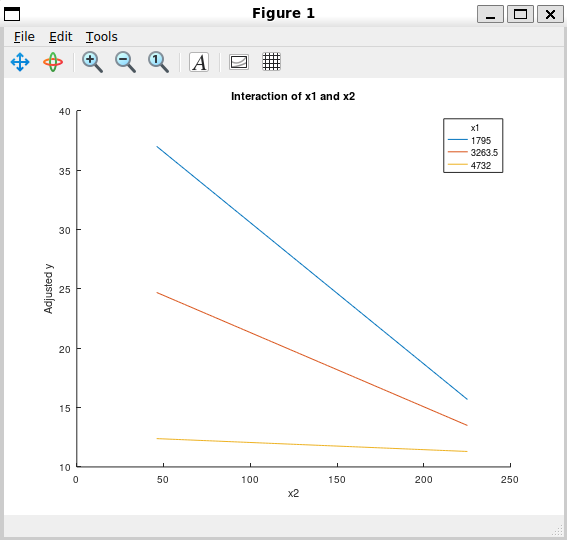
'predictions' mode plots the adjusted response as a curve across the range of the second predictor, with one curve per conditioning level of the first. An interaction shows up here as lines with different slopes.
load carsmall
mdl = fitlm ([Weight, Horsepower], MPG, 'interactions');
plotInteraction (mdl, 'x1', 'x2', 'effects')
plotInteraction (mdl, 'x1', 'x2', 'predictions')
compact and CompactLinearModel - here
compact converts a fitted LinearModel into a CompactLinearModel:
cmdl = compact (mdl)
The idea behind a compact model is to keep only what you need after fitting - the coefficients, formula, model criteria, predictor names, and terms structure - and drop the training data entirely. This makes the object much smaller in memory, which is useful when saving a model to disk or deploying it without the original dataset.
CompactLinearModel is a new class added this week. What is implemented so far is the class structure: all the properties with full documentation, the disp and display methods, the subsref gatekeeper, and the constructor that copies the relevant properties across from a LinearModel.
cmdl = compact (mdl);

cmdl.Coefficients      ## works - copied from the original model
cmdl.Formula           ## works
cmdl.Rsquared          ## works
cmdl.ModelCriterion    ## works

cmdl.Fitted            ## error: unknown property
cmdl.Residuals         ## error: unknown property
cmdl.ObservationInfo   ## error: unknown property
Properties that require the original training data are not present on the compact object at all. Trying to access them throws an error immediately.
The display already works and matches the LinearModel display format:
load carsmall
mdl  = fitlm ([Weight, Horsepower], MPG, 'linear');
cmdl = compact (mdl)
cmdl =

  Compact linear regression model:
      y ~ 1 + x1 + x2

  Coefficients:

  3x4 table

                    Estimate         SE         tStat        pValue
                   ___________    _________    ________    ___________

    (Intercept)        47.7694      1.74166     27.4275    1.75104e-45
    x1             -0.00656513    0.0010507    -6.24836    1.35188e-08
    x2              -0.0420178    0.0186713     -2.2504        0.02686


Number of observations: 93, Error degrees of freedom: 90
Root Mean Squared Error: 4.0673
R-squared: 0.752053,  Adjusted R-Squared: 0.746543
The methods like predict, feval, coefCI, and coefTest will be added on top of this structure next week.
Development Branch
All the code is on this branch: gsoc-2026-linearmodel
Next Steps
- Implementing
predict,feval,random,coefCI, andcoefTestonCompactLinearModel. - stepwiselm - automated model selection by forward and backward stepping.
Stay tuned for the next update!